This article is for administrators.
FAQ
How do I add the Gravity app to my Android or iOS mobile device?
Go to www.thegravityapp.com on your mobile device and log in normally.
The Gravity app is reflexive and automatically adapts to your device so you can share jobs on the go. For more information, refer to Understand Gravity for employee referrals.
Why do I have to authenticate my work email address every time I use Gravity?
If you log in with a social network account that differs from the one you initially signed up with, Gravity will treat you as a new person.
To prevent this: Make sure you log in with the same social network account you originally signed up with.
Is there a delay in Gravity when jobs are updated in Recruiting?
Yes:
There can be a very slight delay for job updates made in Recruiting to appear in Gravity, but it is less than five minutes.
My company has multiple accounts. How do we access the different accounts?
When you log in to Gravity, employees can select a specific company.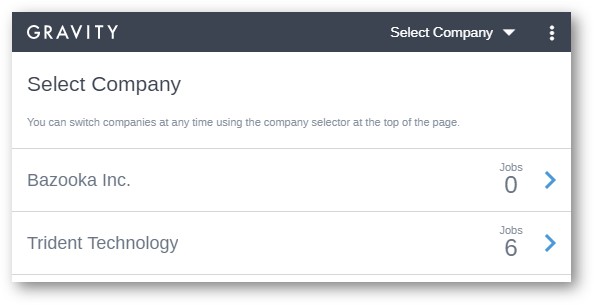
You can also switch companies at any time by selecting the menu at the top of Gravity.
Need multiple companies? Contact Paycor Support to set up multiple Recruiting companies in a group
- gravity app in recruiting
- recruiting gravity app for android
- recruiting gravity app for ios
- apple mobile gravity
- droid gravity app
- mobile jobs app gravity
- recruiting mobile job app gravity frequently asked questions (faq)
- gravity mobile app
- gravity mobile access
- gravity login
- gravity android
- gravity ios
- employee referrals
- gravity questions
- social network login
- referral app
Updated: September 1st, 2026 11709 views 0 likes
*This content is for educational purposes only, is not intended to provide specific legal advice, and should not be used as a substitute for the legal advice of a qualified attorney or other professional. The information may not reflect the most current legal developments, may be changed without notice and is not guaranteed to be complete, correct, or up-to-date.